Imagine you want an app that researches a topic, summarizes what it finds, saves the result, and pings you when it's done.
Sounds simple, right? But actually building that is more complicated than you'd think.
How this used to work
To build something like this, you'd need to sign up for a handful of separate services and somehow connect them all together.
You'd need an AI service for the summarization. A separate search service to pull information from the web. A database to store the results. And a notification service to send the alert.
Then comes the hard part: making them all talk to each other. You'd need to write code that calls one service, takes the response, passes it to the next service, and manages logins and API keys for each one. Then you'd need to find somewhere to host all of that.
And if you've ever worked with AI services, you know they go down. A lot. One service has an outage, another changes their API, a third starts rate limiting you out of nowhere. You end up spending more time babysitting the connections between services than building the thing you actually wanted.
If you're a developer, that's a weekend project that turns into an ongoing maintenance headache. If you're not, it's a dead end.
How it works now
Open Envelope and describe what you want. "An app that researches a topic, summarizes it, saves the results, and sends me a notification."
The AI builds both the app and the automation behind it.
Behind the scenes, it creates a workflow. That's a sequence of steps that runs automatically when someone taps a button:
- Search the web for current information on the topic
- Summarize the results using AI to create a clean digest
- Save the summary to the app's built-in database
- Send a push notification when the digest is ready
No separate accounts to set up. No code to write. No hosting to figure out. And Envelope handles the reliability for you. If an AI service is having issues, we route around it automatically with built-in fallbacks so your app keeps working. You don't have to monitor anything.
The user taps a button, waits a few seconds, and gets their results.
You can see and edit the logic visually
Every workflow shows up in the Workflow Editor. It's a canvas where each step is a block you can see, click, and configure. You can follow the flow from start to finish, change what the AI says, adjust a condition, or add a new step.
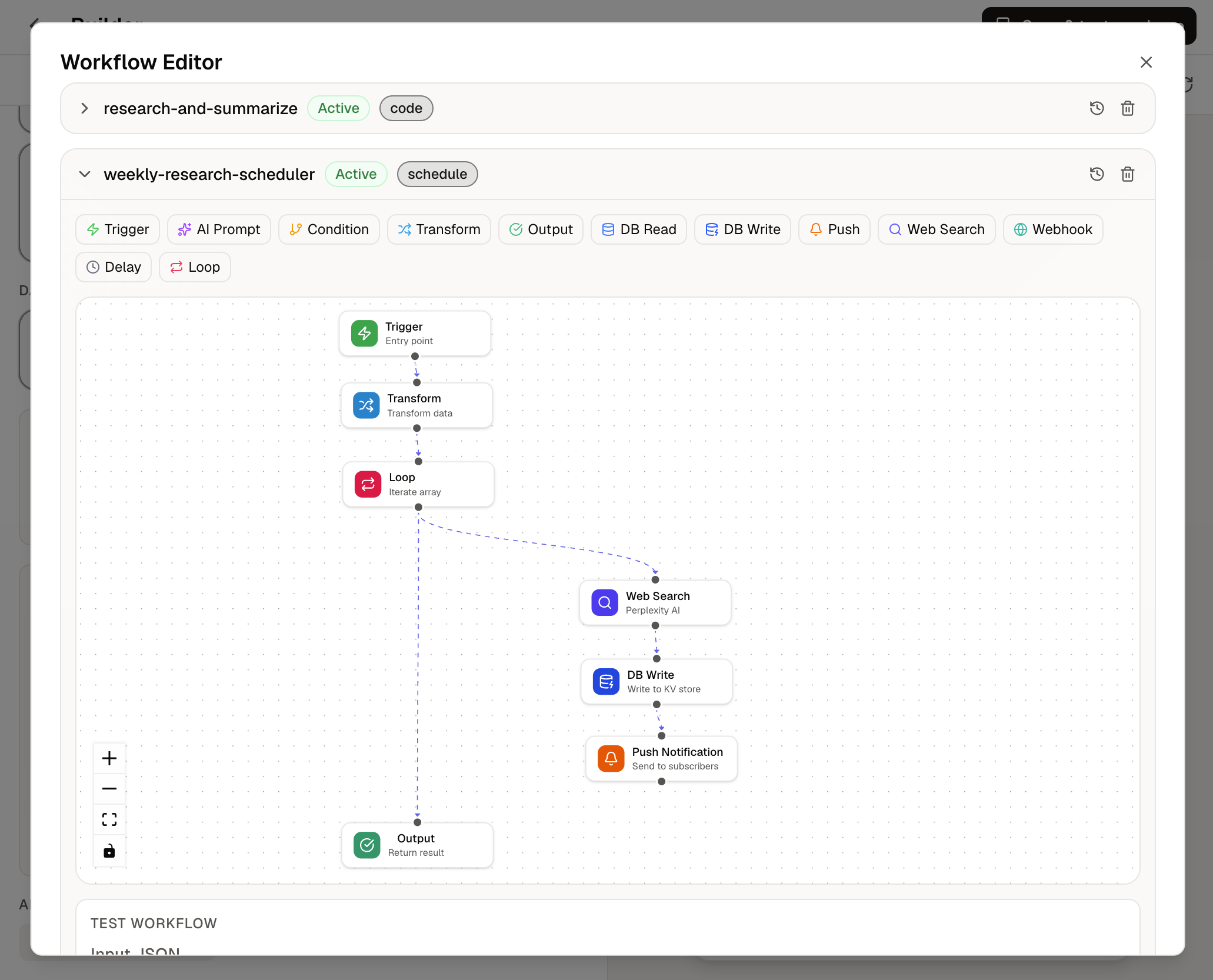
Here are the types of blocks you can use:
- AI Prompt: Ask AI to process, summarize, or generate text using data from previous steps
- Web Search: Pull real-time information from the web
- Database Read / Write: Save or retrieve data from your app's built-in storage
- Push Notification: Send an alert to people who've installed your app
- Condition: Take a different path depending on whether something is true or false
- Transform: Reshape data between steps
- Webhook: Connect to any outside service
- Loop and Delay: Repeat steps or wait before continuing
Each block can use the output from the blocks before it. A search result feeds into an AI summary. The summary gets saved to the database. The save triggers a notification. Everything connects automatically.
What people are building with this
- Daily digest bots that pull news on a topic every morning, summarize it, and send a notification
- Research tools that take a company name, find recent news about it, and generate a briefing
- Content helpers that research a topic, draft a summary, and save it for review
- Monitoring apps that check on something regularly and send an alert if anything changes
The pattern is always the same: start with a trigger, gather information, process it, save it, and notify someone. Things that used to require juggling multiple paid services and writing custom code now happen from a single prompt.
Try it
Open Envelope and describe an app that needs to do more than one thing. The AI will figure out that it needs a workflow and build one for you. Or open the Workflow Editor on any existing app and set one up yourself.