You're already chatting with ChatGPT every day. You get an idea, like a tip splitter, a reading tracker, or a tool for your soccer team. Normally that idea dies in the chat. Now it doesn't.
Envelope plugs into ChatGPT. You describe what you want, ChatGPT builds it, and you get a link you can share and install on your phone. All without opening another tab.
What that actually looks like
You open ChatGPT and type:
Build me a tip calculator. Let people split the bill between friends, choose a tip percentage, and see what each person owes. Make it look clean.
ChatGPT writes the app and sends you back a link to try it.
You tap it. It works, but:
The buttons are too small on mobile. Make them bigger and add a 20% tip preset.
The app updates. Same link. No re-upload, no redeploy.
Looks good. Publish it.
Now it's live at envelope.build/tip-calculator. You text the link to your friends, they open it on their phones, tap "Add to Home Screen," and it's an app on their phone, just like any other.
The whole thing takes a few minutes.
What you can do in chat
- Describe an app. ChatGPT builds it and gives you a preview to try.
- Change your mind. "Make the background dark." "Add a save button." The app updates in place.
- Publish it. One sentence and your app has a public link.
- Upload stuff. Drop images, audio, or a list of recipes into chat and ChatGPT wires it into the app.
- Fix errors. If something breaks, ChatGPT can see the error and fix it without you copy-pasting.
- Manage your apps. List them, delete old ones, or pick one to edit, all from chat.
Setting it up
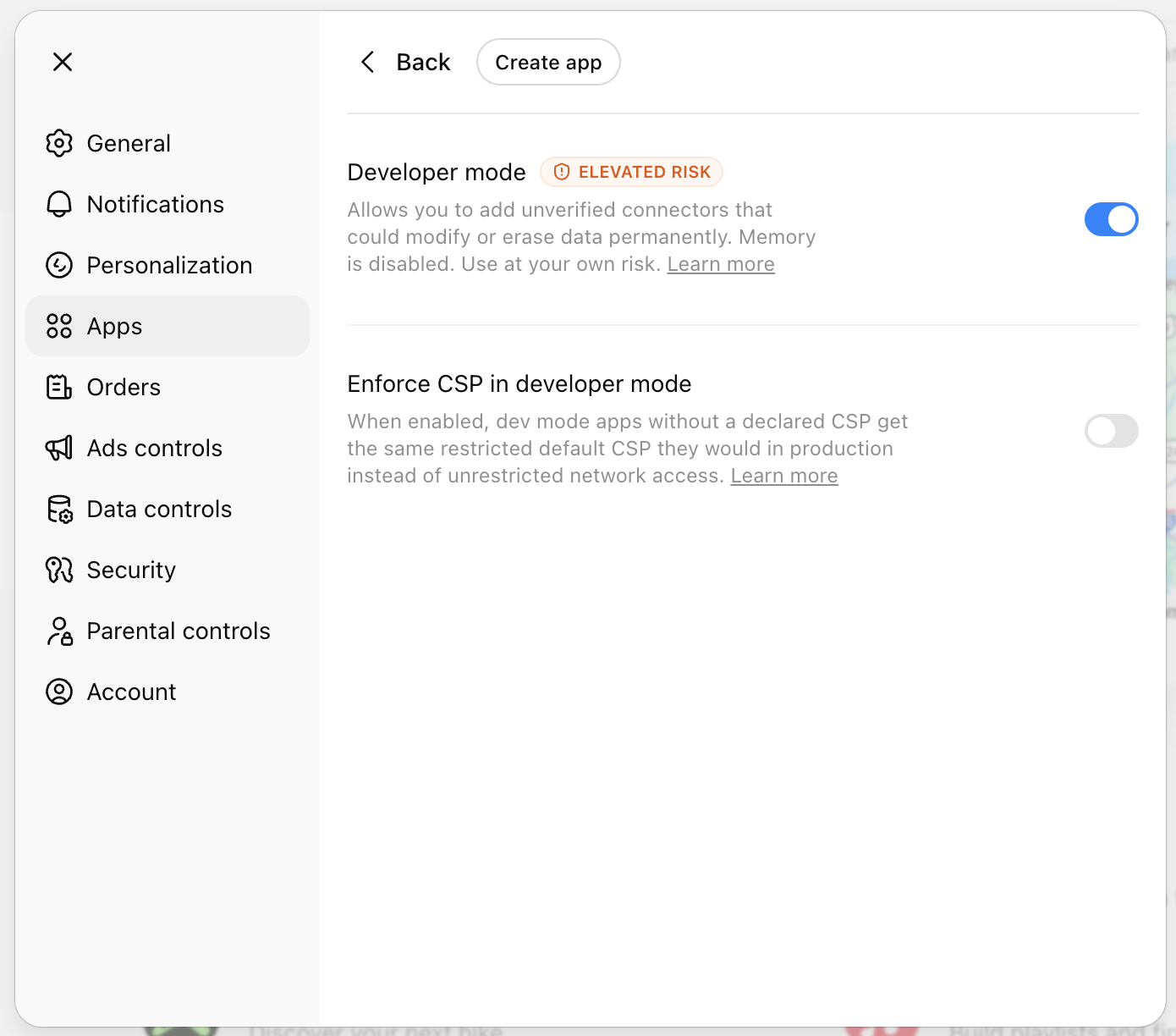
To keep third-party tools from being able to change your data without you knowing, ChatGPT puts tools like Envelope behind a "Developer mode" switch. You only have to flip it once.
- Open ChatGPT's Advanced settings.
- Turn on Developer mode. ChatGPT shows a warning, which is normal for any third-party tool. Accept it.
- Click Create app at the top of the same screen.
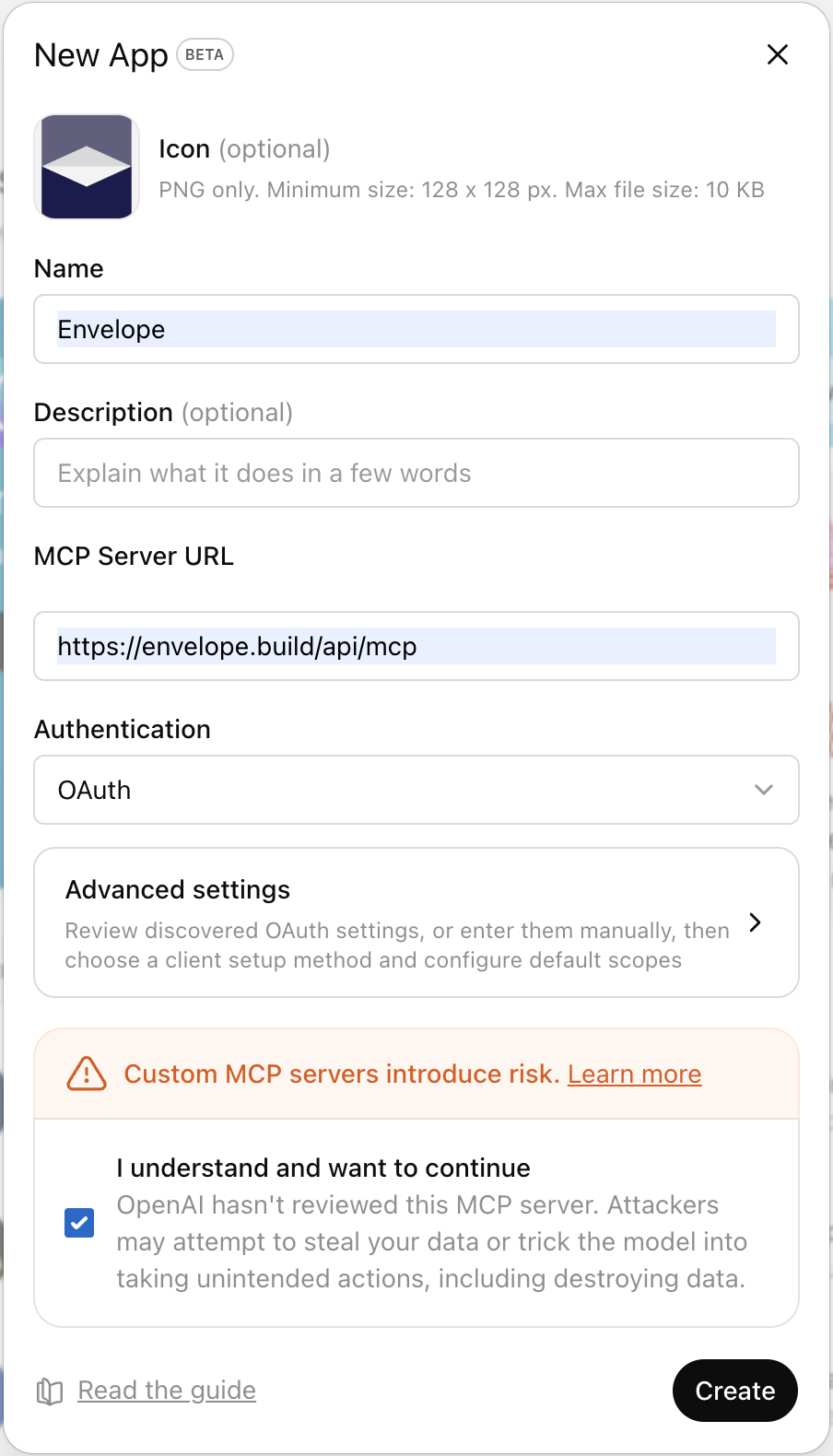
- Enter "Envelope" as the name, paste
https://envelope.build/api/mcpas the MCP Server URL, choose OAuth for sign-in, and check "I understand and want to continue". - Click Create. A browser window opens so you can sign in to your Envelope account.
- Start a new chat, turn the Envelope app on for that chat, and ask ChatGPT to build something.
A couple of things to know:
- ChatGPT turns off its memory while Developer mode is on. That's ChatGPT's call, not ours. Once OpenAI adds a way to verify third-party tools, we'll be on that list and this will go away.
- You'll need a paid ChatGPT plan (Plus, Pro, Business, Enterprise, or Edu). Free accounts can't add custom tools yet.
Why we built this
If you live in ChatGPT already, opening a separate tool to build an app is friction. Envelope exists so that moment where you think "someone should build X" becomes "I just built X." Doing that inside the chat you were already having makes it even shorter.
And this isn't ChatGPT-only. The same Envelope connection works with Claude and any other AI assistant that supports the same standard. One Envelope account, whichever AI you prefer.
Try it
Go to your ChatGPT Advanced settings, follow the steps above, and use this URL when asked:
https://envelope.build/api/mcp
Then describe what you want. ChatGPT builds it. You share the link.