Integrations
Connect third-party services like HubSpot, Slack, and Google Sheets to your Envelope apps. Integrations let your apps read and write data from external platforms using OAuth, with no API keys or custom auth code needed.
Integrations connect in one of two ways. Some, like Google Sheets, are connected once by you as the app owner; your users never see a Google sign-in or know a spreadsheet exists. Others, like HubSpot and Slack, are connected by each user of the app with their own account.
Getting started
- Enable Integrations: In the builder, go to the Configure tab and toggle on Integrations.
- Connect a service: Click Connect next to the integration you want.
- Authorize: A popup will open asking you to sign in and grant access to your account.
- Build: Use the integration methods in your app code via
envelope.integrations.<provider>.<method>().
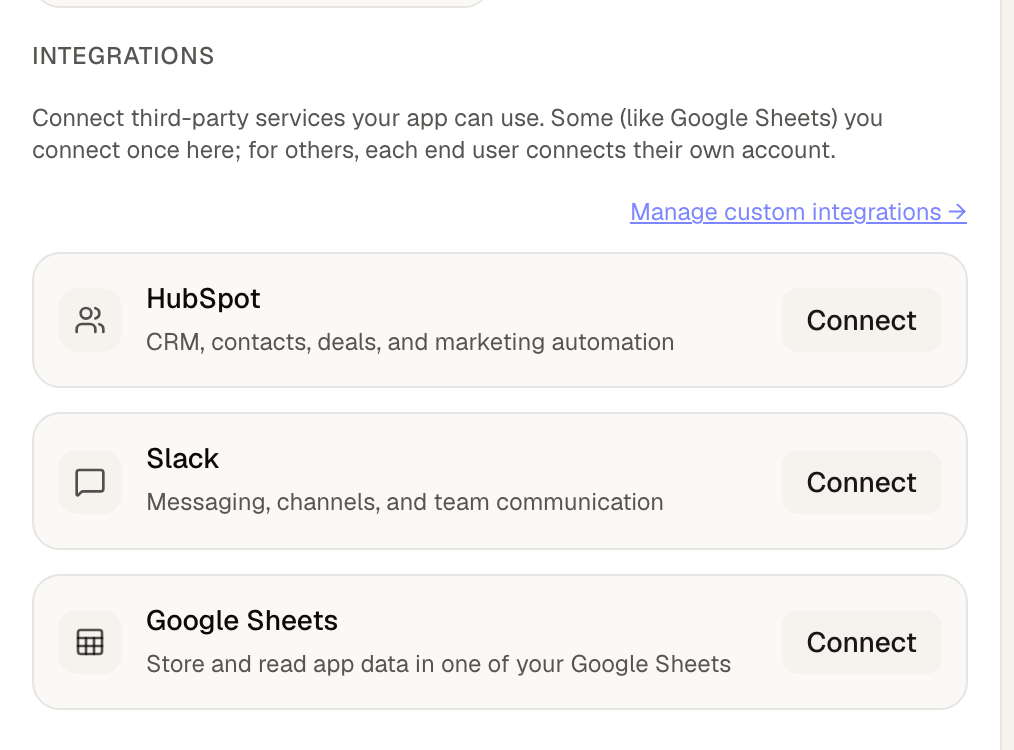
Available integrations
CRM platform for managing contacts, companies, deals, and pipelines.
What you can do:
- List, create, update, and delete contacts
- Manage companies and deals
- View deal pipelines and stages
- Search across contacts, companies, and deals
Setup:
- Toggle on Integrations in the Configure tab.
- Click "Connect" next to HubSpot.
- Sign in to your HubSpot account and authorize Envelope.
Using integrations in your app
When you describe your app to the AI builder, mention which integrations you want to use. The AI will generate the connection screen and API calls automatically.
Example prompts:
- "Build a CRM dashboard that lists my HubSpot contacts and lets me create new ones"
- "Create a team notification app that sends Slack messages when I submit a form"
- "Make a mood tracker that saves each entry to Google Sheets"
Workflows
Integrations are also available as workflow nodes. You can automate actions like:
- Create a HubSpot contact when a form is submitted
- Send a Slack notification when a workflow completes
- Search HubSpot deals and send results to Slack
In the workflow editor, drag an Integration node from the palette and configure the provider, method, and parameters.
Signed webhooks
When a workflow uses a webhook trigger and contains an Integration node (e.g., HubSpot or Slack), Envelope requires the incoming request to be HMAC-signed. This prevents anyone who discovers the webhook URL from impersonating the app owner against third-party services.
How it works:
- When you create a webhook workflow with an Integration node, Envelope generates a signing secret (visible in the workflow editor)
- The sender must include an
X-Envelope-Signatureheader with every request - Header format:
t=<unix_timestamp>,v1=<hex_signature> - Signature:
HMAC-SHA256(secret, "<timestamp>.<request_body>") - Requests older than 5 minutes are rejected
Example (Node.js):
const crypto = require('crypto');

const secret = 'your-webhook-secret';
const timestamp = Math.floor(Date.now() / 1000);
const body = JSON.stringify({ email: 'jane@example.com' });
const signature = crypto
  .createHmac('sha256', secret)
  .update(`${timestamp}.${body}`)
  .digest('hex');

fetch('https://envelope.build/api/workflow/webhook/your-slug', {
  method: 'POST',
  headers: {
    'Content-Type': 'application/json',
    'X-Envelope-Signature': `t=${timestamp},v1=${signature}`,
  },
  body,
});
Note: Workflows that don't use Integration nodes (pure data transforms, AI prompts, etc.) do not require signing; unsigned POST requests continue to work.
Troubleshooting
"Integrations is not enabled for this app"
Cause: The Integrations module isn't toggled on.
Fix: Go to the Configure tab in the builder and toggle on Integrations.
HubSpot contact is created but fields are empty
Cause: The properties aren't being passed correctly in the API call.
Fix: Make sure the createContact call uses this exact format:
envelope.integrations.hubspot.createContact({
  data: {
    properties: {
      email: "jane@example.com",
      firstname: "Jane",
      lastname: "Doe",
      company: "Acme Corp"
    }
  }
})
Slack message not appearing in the channel
Cause: The Envelope bot hasn't been invited to the channel.
Fix: In Slack, go to the channel and type:
/invite @Envelope
Or click the channel name → Integrations tab → Add an App → select your Envelope app.
"redirect_uri did not match any configured URIs"
Cause: The OAuth callback URL doesn't match what's registered with the provider.
Fix: This is a platform configuration issue. Contact support if you see this error.
"not_connected" error when calling an integration method
Cause: The user hasn't connected their account for this integration yet.
Fix: Your app should check connection status on load and show a "Connect" button:
const connected = await envelope.integrations.hubspot.isConnected();
if (!connected) {
  // Show a connect button that calls:
  await envelope.integrations.hubspot.connect();
}
Connection popup opens but nothing happens after authorizing
Cause: The popup may have been blocked by the browser, or the callback URL isn't configured correctly.
Fix:
- Make sure your browser allows popups from the Envelope domain
- Try again; the popup should redirect back automatically after authorization
Integration calls timing out
Cause: The external API may be slow or rate-limited.
Fix: Integration calls have a 30-second timeout. If you're making many calls in sequence, add small delays between them or use pagination with smaller page sizes.
Next steps
- Workflows: automate integration calls in the background
- SDK Reference: the full
envelope.integrationsAPI